
Earlier this year a client asked us for the markdown file, the .md that sat behind the Figma boards.
A design system file for AI is a plain-text document that tells AI tools how a product must look and behave, and Google has published an open format for it, DESIGN.md. The basics go in quickly: color, typography, spacing and corner radius tokens take an hour or so. The rules that keep the AI from drifting off the system are written over the whole project, which is why we now license the file by default.
That first request came from Callyope, at the end of the first product we designed with AI working alongside us from day one: a consumer app for patients and a web app for the psychiatrists who follow them, both on a single design system. By then the file held months of decisions, and the team wanted to keep building with it after we left.
Where DESIGN.md comes from
On April 21, 2026, Google Labs open-sourced DESIGN.md, the format behind its Stitch design tool. Cassia Xu, the Google engineer who announced it, put the promise simply: "AI agents can know exactly what a color is for" (Google, 2026). The specification on GitHub splits a file into two kinds of content: design tokens (exact values for color, type, spacing and components) and written intent, the reasons behind them.
Design teams had been writing these files under other names for a while. Developers have kept CLAUDE.md and .cursorrules files to brief their coding agents since 2025. What Google added is a shared shape, so a file written for one tool can be read by another.
What we put in ours
Tokens are the part everyone writes, and the part the AI gets right most easily. Most of our file goes beyond tokens.
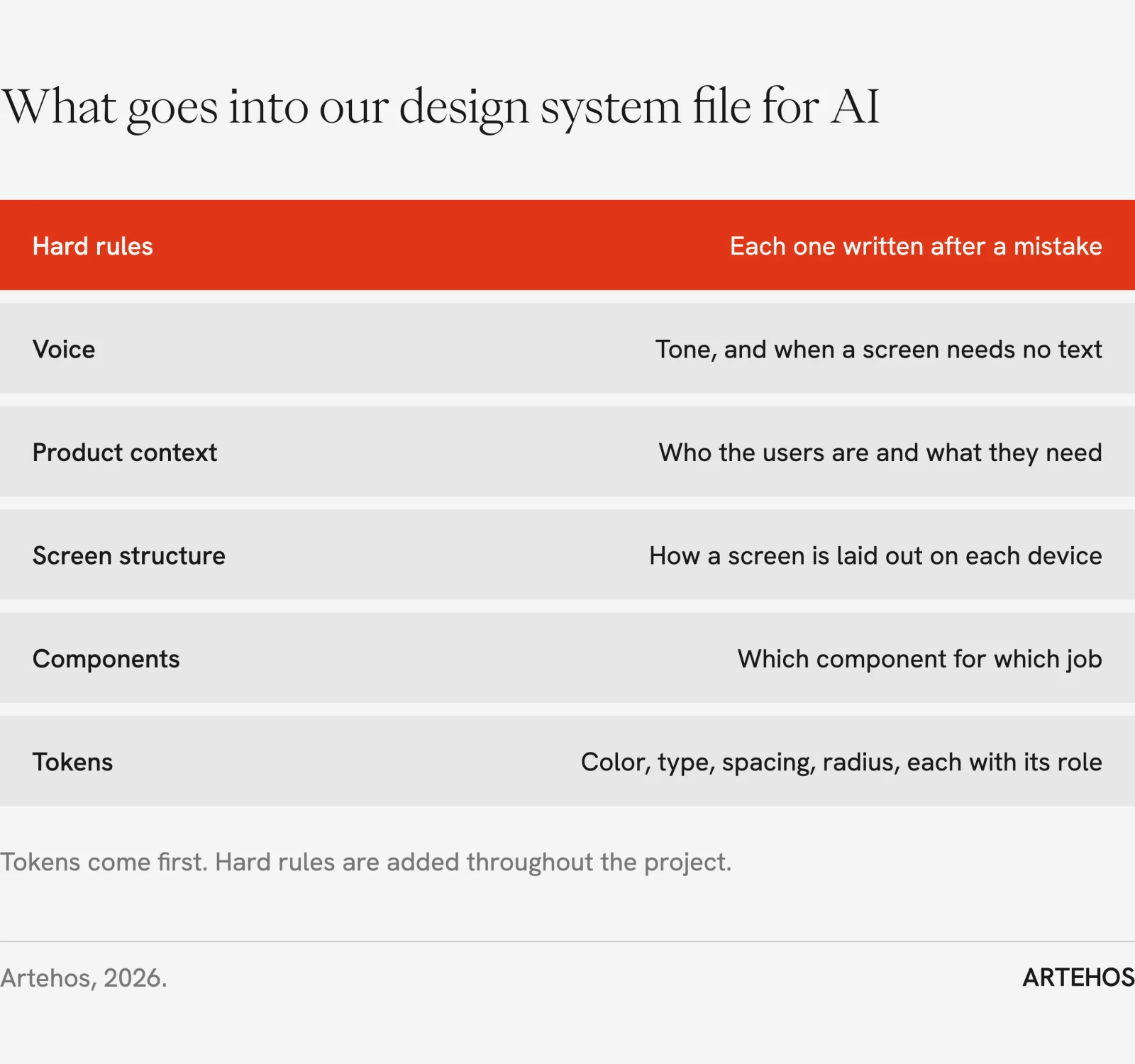
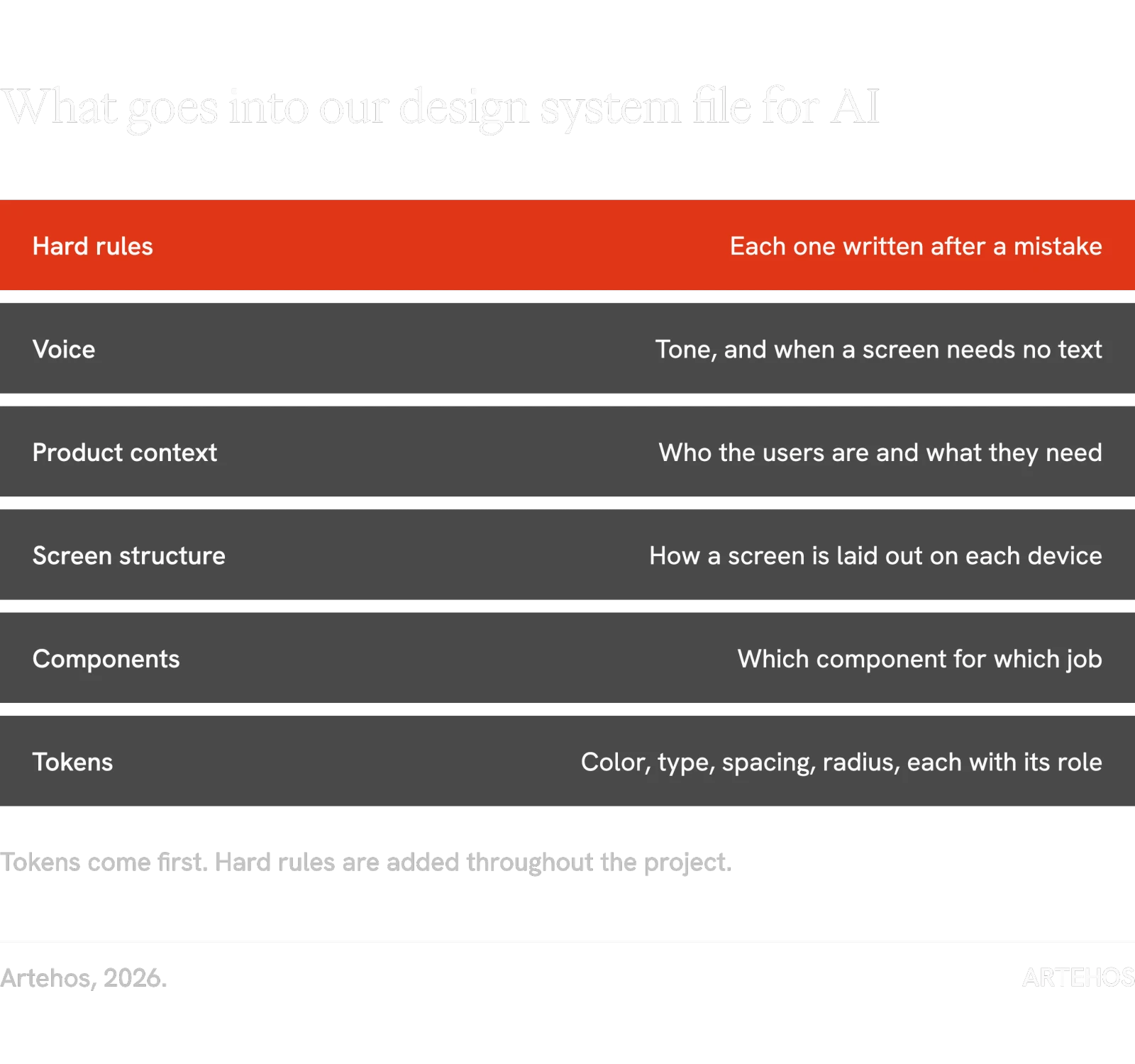
Tokens come from the Figma variables on day one. Components and screen structure come from the first screens we design by hand, product context from workshops with the client. The hard rules at the top are the layer that matters most, and no template can give them to you.
In Callyope's file, each rule is a single line, loaded at the start of every session. The incident behind it, sometimes with the designer's own words, sits in a separate document the AI opens when a task touches that rule. The top of the file has a section called "The rule I keep breaking".
The rules come from the AI's mistakes
The bigger the file gets, the more the AI forgets. A product with two apps, a few hundred variables and a library of components is more context than any model holds with equal attention, so things fall out of focus, and often the same kinds of thing.
So we keep a list. When the AI makes the same mistake twice, the mistake becomes a rule, and we ask the AI to write the rule itself, in its own words, so it recognizes the situation next time. The list is re-read in full after every large handover between the design work and the AI. Three that came out of the Callyope project:
- The practitioner web app reuses the patient app's design system, but the AI kept building lookalikes instead: a pill-shaped button where the library already had the right one, a bordered button where the pattern was a text link. Rule: before building any control, search the existing library, and never build a lookalike.
- When a client asks for several revisions of a flow, we design the options as loose drafts, since most of them will be thrown away. The client approves one, the project moves on, and the approved draft never gets turned into components. The AI then builds new screens on top of those loose pieces, and the system starts to split in two. Rule: anything used twice becomes a component, and a new design direction goes on a new board, not into an existing one.
- The AI kept giving the two options of a choice the same weight, two filled buttons side by side, so neither stood out. Rule: two options of the same action never share a button weight: one primary and one secondary, or a text link next to a button. It is the rule at the very top of the file, under "The rule I keep breaking".
The other fight is with the model's own habits. Every AI tool carries the defaults of the company that trained it, and they show up in the design. With Claude, the model we use most, screens come back over-explained: a helper sentence under every heading, a short summary of what the user is looking at, a line of reassurance after every action. On a clinical product that is noise. So a section of the file switches those defaults off: no explanatory captions (definitions go behind an info icon), no helper sentence where a disabled button already says enough, and no copy that repeats what the screen shows. It also says what to keep, such as a short line telling the clinician what an AI summary is built from and that it needs validating.
After a few months, the hard rules are where most of the file's value sits. Nobody can write them in advance, because they record what this AI did on this product.
The file is built over the whole project
The file grows for as long as the project runs, because the AI works with us the whole way through: it reads every change we make in Figma, drafts screens against the system, and gets corrected when it drifts. A two-month build of a B2B web app means two months of file. At handover the client receives the Figma library and the file together, and the file is the part that lets their own team, and their own AI tools, keep building in the same language.
That changes what a design project produces. A Figma file shows how the product looked on the day we handed it over. The markdown file tells the next designer, developer or agent how to design the screens that come after.
Figma MCP, DESIGN.md, or both
Figma's MCP server lets AI coding tools read a Figma file directly: its variables, components and layout rules. Teams ask us whether that makes a separate file unnecessary.
Our rule of thumb: if one designer owns the product and the screens rarely change, Figma's MCP plus a clean token library is often enough. If several people, or several AI tools, build screens in parallel, you need the file, because Figma can tell an agent what a component looks like but not when to use it, and nothing in Figma records the mistakes your AI keeps making.
Who should own it
When Callyope asked for the file, we had not yet decided who should own it. The file can be the most useful thing a project produces, because it lets a client keep building at speed with a smaller team. We now offer two models.
With a buyout, the client owns the file outright, delivered with the brand guidelines and the Figma library: everything needed to run the brand and scale the product on their own. With a license, which is our default while a product is still changing, we keep ownership, the client's team and AI tools get full access, and we keep training the file as the product evolves, on a monthly retainer.
Most products we see have a design system in Figma and no file for AI yet. If yours is one of them, we can build its DESIGN.md from the system you already have.